
How to connect Walmart store to API2Cart?
To connect Walmart store to API2Cart you will need:
- Client Id
- Client Secret
- Walmart environment
And, for a connection through the Walmart App Store, also:
- OAuth Refresh Token
- Seller ID
Walmart US supports two authorization models, and the one you use depends on who owns the credentials:
-
Seller API keys — the seller's own Client Id
and Client Secret from the Walmart Developer Portal. This is the
usual way to connect and it works for both the
usand thecaregion. -
Walmart App Store authorization (OAuth 2.0) — the
seller connects an approved Solution Provider application in Seller
Center, and that application receives a refresh token on the seller's
behalf. Use this when you are an approved Solution Provider with your own
Walmart App Store listing. Supported for the
usregion only.
Delegated Access keys are being retired by Walmart. The ability for approved Solution Providers to create new Delegated Access keys was retired on July 30, 2026, and existing Delegated Access keys will continue to work only until the end of September 2026. If a store is connected to API2Cart with a delegated key, replace those credentials before that date — see Migrating a store that uses a Delegated Access key. Nothing changes for stores connected with a seller's own key pair.
Option 1: Get the seller API keys
Log in to the seller account and go to the API Key Management section. (Or you can switch to https://developer.walmart.com/ and log in there under your account).
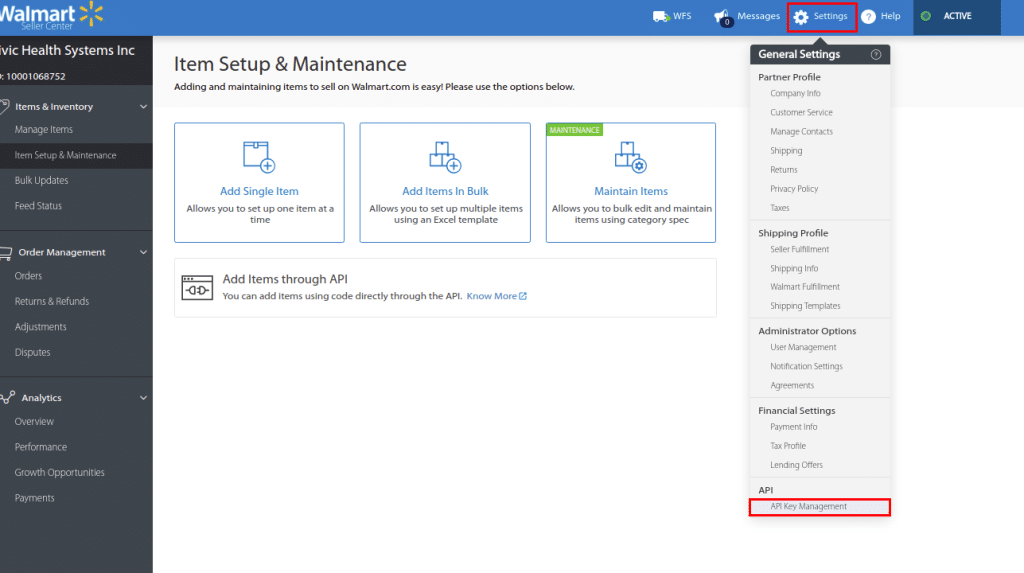

There you can get access to existing keys for production and sandbox environments. Locate your personal key pair — it has a lock icon next to it — and copy the Client Id and Client Secret.

Option 2: Get the Walmart App Store credentials
In this mode Client Id and Client Secret are the credentials of your application, not of the seller. The seller identity is carried by the refresh token and the seller id.
- The seller logs in to Walmart Seller Center, opens Apps, browses App Listings, selects your application and clicks Connect.
-
The seller signs in and authorizes the application. Walmart then redirects
the browser to your callback URL with an authorization
codeand thesellerId. -
Your application exchanges that authorization code for tokens by calling
the Walmart Token API with
grant_type=authorization_code. The response contains arefresh_token, which stays valid for one year.
API2Cart requests and renews the short-lived access tokens itself. If the
refresh token expires or the seller revokes the authorization, ask the
seller to reauthorize the application in the Walmart App Store, then send
the new token with the account.config.update method.
Add the connection to API2Cart
Use Client Id and Client Secret when adding Walmart store to API2Cart (walmart_client_id and walmart_client_secret parameters).
Parameter walmart_environment you can leave empty or specify the value production if the production key is used. In case the sandbox key is used be sure to specify the sandbox value for walmart_environment parameter.
For a connection through the Walmart App Store, add
walmart_refresh_token and walmart_seller_id. These two are
always sent together, and only for the us region.

| Parameter | Seller API keys | Walmart App Store (OAuth 2.0) | Example |
|---|---|---|---|
walmart_client_id |
Required — the seller's Client Id. For the ca region use the Consumer ID |
Required — Client Id of your application | 66874dfd-1d5g-476v-8k2c-e22g46c6727k |
walmart_client_secret |
Required — the seller's Client Secret. For the ca region use the Private Key |
Required — Client Secret of your application | AKk1bFaKeSecReTvALue0987654321 |
walmart_refresh_token |
Not used | Required — refresh token received when the seller authorized your application. Must be sent together with walmart_seller_id |
eyJraWQiOiIxYmIxMTYyNS1lM2Y2... |
walmart_seller_id |
Not used | Required — seller id returned together with the authorization code. Must be sent together with walmart_refresh_token |
10000004372 |
walmart_environment |
Optional, defaults to production. Set sandbox when a sandbox key is used |
production |
|
walmart_region |
Optional, defaults to us. The App Store authorization is supported for us only |
us |
|
walmart_channel_type |
Optional — the Consumer Channel Type issued by Walmart during onboarding | 0f3e4dd4-0514-4346-b39d-af0e00ea066d |
|
API scopes
When a seller authorizes a Solution Provider application in the Walmart App Store, Walmart shows the list of scopes the application requests, and the seller approves them. The table below shows which Walmart Marketplace scopes API2Cart uses and which API2Cart methods depend on each of them. A seller's own personal key pair already has full access, so this table matters for the App Store authorization.
| Walmart scope | Used by API2Cart for | Required |
|---|---|---|
| Items | product.list, product.info, product.count, product.find, product.add, product.delete, category.list, category.count, category.info |
Yes |
| Inventory | Quantity in product.list and product.info; quantity updates in product.update |
Yes |
| Pricing & Promotions | Price updates in product.update |
Yes |
| Orders | order.list, order.info, order.count, order.shipment.list, order.shipment.add |
Yes |
| Returns | Refund data returned with order.list and order.info |
Yes |
| Account Profile | Store details in cart.info |
Yes |
| Shipping | Shipping templates and ship nodes in cart.info |
Yes |
| WFS | Walmart Fulfillment Services quantity in product.list and product.info |
Only for WFS sellers |
| Analytics | Not used by API2Cart | No |
Migrating a store that uses a Delegated Access key
A Delegated Access key looks exactly like a seller key — a Client Id and a Client Secret — so a store connected with one keeps working until Walmart switches those keys off. After that, every call fails with Some parameters are not valid. Please set correct walmart_client_id and walmart_client_secret.
To migrate, get new credentials and send them with the account.config.update method. The store key does not change and the store does not need to be re-added:
- If the seller runs the integration themselves, take the Client Id and Client Secret of their personal key pair (Option 1).
- If you are an approved Solution Provider, ask the seller to reconnect your application in the Walmart App Store, then send walmart_client_id, walmart_client_secret, walmart_refresh_token and walmart_seller_id (Option 2).
